LOCAL BUSINESS / GOOGLE ADS
Good enquiries.Within reach.
A practical guide to location options, service radius and search terms when enquiries come from too far away.
Explore this page ↓
THE CONTEXT
Are you tired of your phone ringing only for the caller to be 50 kilometers away? If you run a local business, every rupee of your ad balance matters. You put money in, hoping for a "plumber near me" or "dentist near me" call, but instead, Google shows your ad to someone in a completely different city.
A paid enquiry has limited value if the customer is too far away to use your service. Start by comparing the enquiry location, the campaign’s location options and the available search terms.
PRACTICAL GUIDE
Why Google Shows Your Ads to Faraway People
Google’s default “Presence or interest” option can include people outside your target area who have shown interest in that area. Whether that is useful depends on your business and how far customers are willing to travel.
For a local walk-in business, an enquiry from another city may be a poor fit. Review the actual enquiries before deciding whether a narrower location option is appropriate.
PRACTICAL GUIDE
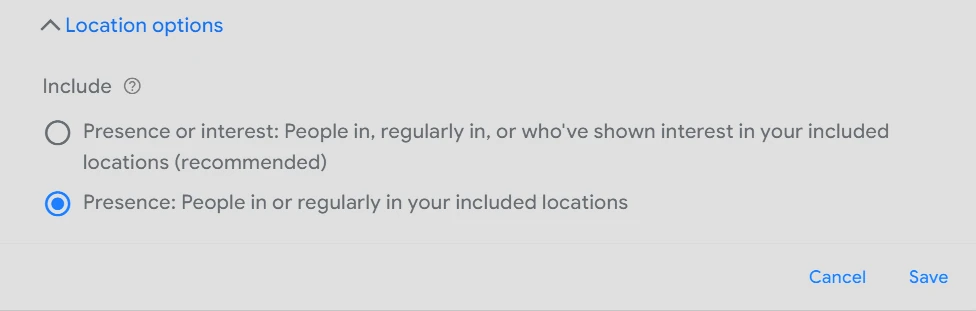
Check the Presence option.
Presence focuses on people Google considers likely to be in or regularly in your target area. It is not a guarantee of their exact position at the moment of the click.
- Go to your Campaign Settings.
- Expand the Locations section.
- Open Location options.
- Change the target setting to: Presence: People in or regularly in your targeted locations.
- Click Save.
 View full image ↗
PRACTICAL GUIDE
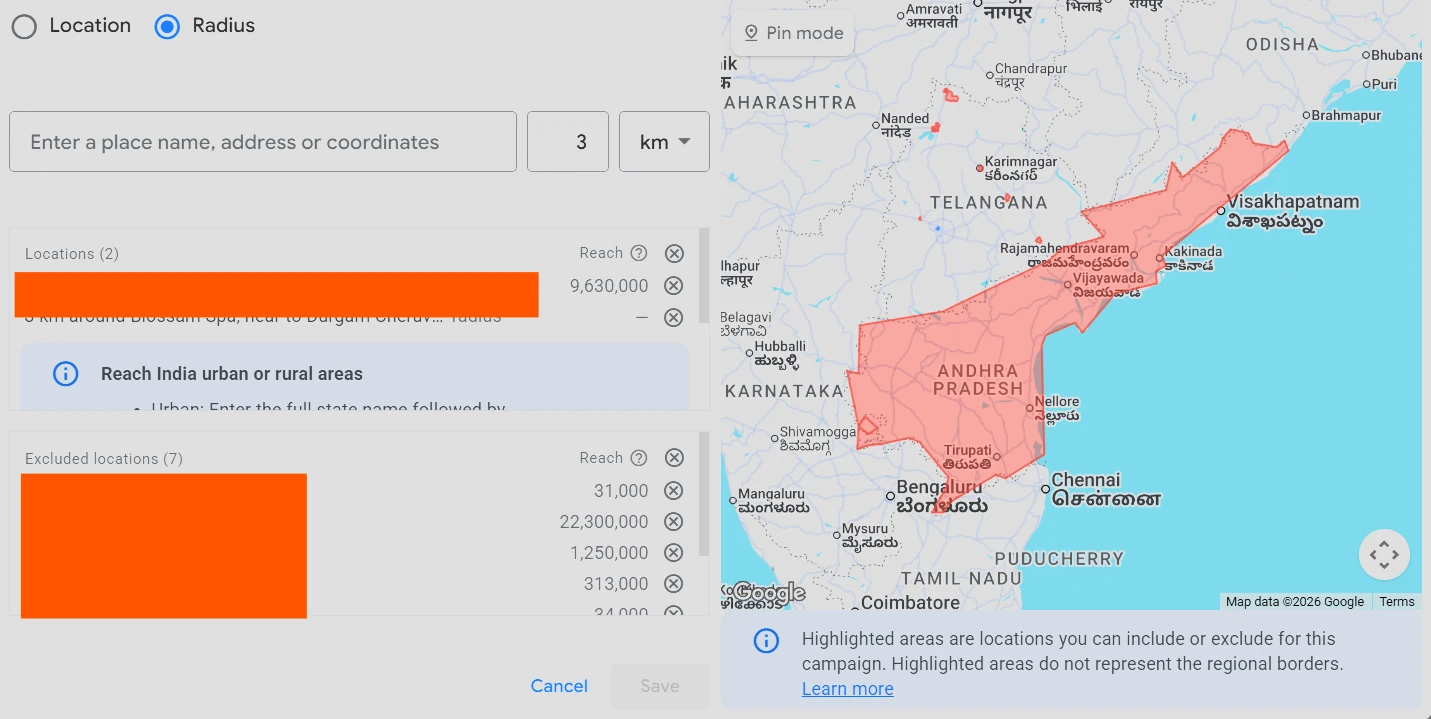
Choose a catchment customers can reach.
Set the catchment around the address customers actually visit. A radius such as 5 km is a planning example, not a rule for every business. Travel time, the service and customer behaviour matter.
- In your Campaign Settings, go to the Locations tab.
- Click Advanced Search.
- Select the Radius icon.
- Drop a pin on your exact business location and set a tight radius (e.g., 5km).
 View full image ↗
PRACTICAL GUIDE
Step 3: Excluding Faraway Locations
Add negative keywords for clearly unwanted destination searches after checking overlap with your actual catchment. Negative matching does not cover every close variant.
PRACTICAL GUIDE
Check the rest of the account.
Even if you fix the settings, these common traps can still bring in long-distance leads:
- Search partners: compare network performance and enquiry quality before deciding whether this traffic is useful. It does not inherently override location settings.
- Keyword matching: review available search terms and conversion quality. Irrelevant queries need attention, but broad match does not automatically override location targeting.
- Campaign vs Account: Sometimes settings are fixed in one campaign but a second campaign is still set to "Interest."
PRACTICAL GUIDE
Review settings first. Then lead quality.
Confirm that the settings were saved, then review location reports, search terms and reception feedback as fresh data becomes available. An early check after 48 hours can spot problems, but a low-volume account may need longer to judge lead quality.
- Location reports: check what each report measures. Google uses several location signals, and reported locations are not exact GPS positions for every click.
- Search terms: review the available queries for irrelevant destinations and intent. Some queries are omitted by Google, so include reception feedback in the review.
PRACTICAL GUIDE
Help with local lead quality.
Ads By Akshar works with local businesses on Google Ads, landing pages and conversion tracking. The review starts with the actual branch, services, catchment and enquiries.
We review the search terms available in your account and compare them with customer feedback. Negative keywords are tailored to your business so that relevant services and nearby customers are not blocked.
PRACTICAL GUIDE
Related Marketing Guides

QUESTIONS & ANSWERS
Frequently Asked Questions
What is the difference between Presence and Interest in Google Ads?
Presence or Interest can include people interested in your target area who are elsewhere. Presence focuses on people likely to be in or regularly in that area.
Do I need a massive budget for local lead generation?
You do not necessarily need to increase the budget first. Review location settings, search terms and enquiry quality to see where the existing spend can work better. More customers are not guaranteed by changing a setting.

ADS BY AKSHAR
Practical work.
Useful perspective.
Based in Hyderabad. Working with businesses across India.
Our story ↗