
Are you tired of your phone ringing only for the caller to be 50 kilometers away? If you run a local business, every rupee of your ad balance matters. You put money in, hoping for a "plumber near me" or "dentist near me" call, but instead, Google shows your ad to someone in a completely different city.
These long-distance leads are the #1 reason for wasted budget in Google Ads for local business. A click from someone too far away to visit you is a click that you paid for, but can never convert. This guide will show you the exact settings needed to stop the bleed and focus strictly on local lead generation.
Table of Contents
1. Why Google Shows Your Ads to Faraway People
By default, Google Ads wants to show your business to as many people as possible. The hidden setting causing your long-distance leads is called "Presence or Interest."
This setting tells Google: "Show my ad to people *in* my area AND people who live far away but have shown *interest* in your area." If someone in a different city searches for services in your neighborhood, Google happily takes your money for that click—even if that person will never drive to you.
2. Step 1: Force the "Presence Only" Setting
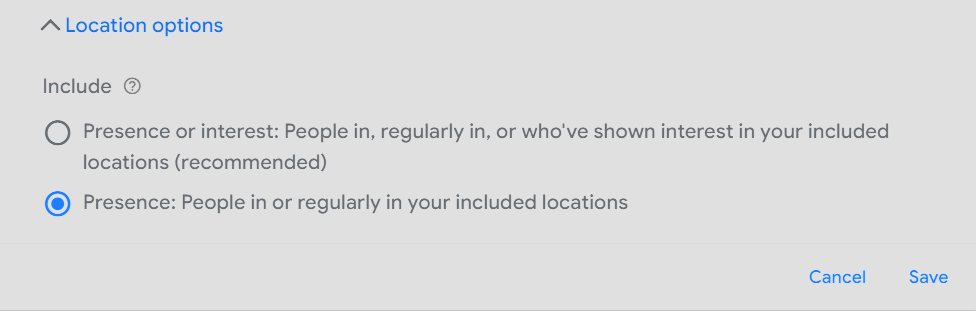
To stop long-distance leads, you must switch to "Presence" targeting only. This ensures your ad *only* triggers for people physically located in your target zone.
- Go to your Campaign Settings.
- Expand the Locations section.
- Open Location options.
- Change the target setting to: Presence: People in or regularly in your targeted locations.
- Click Save.
3. Step 2: Set a Realistic Service Radius
Are you targeting your whole city? If you are a dentist or a salon owner, nobody is driving an hour for your service. You need a pin-drop radius.
- In your Campaign Settings, go to the Locations tab.
- Click Advanced Search.
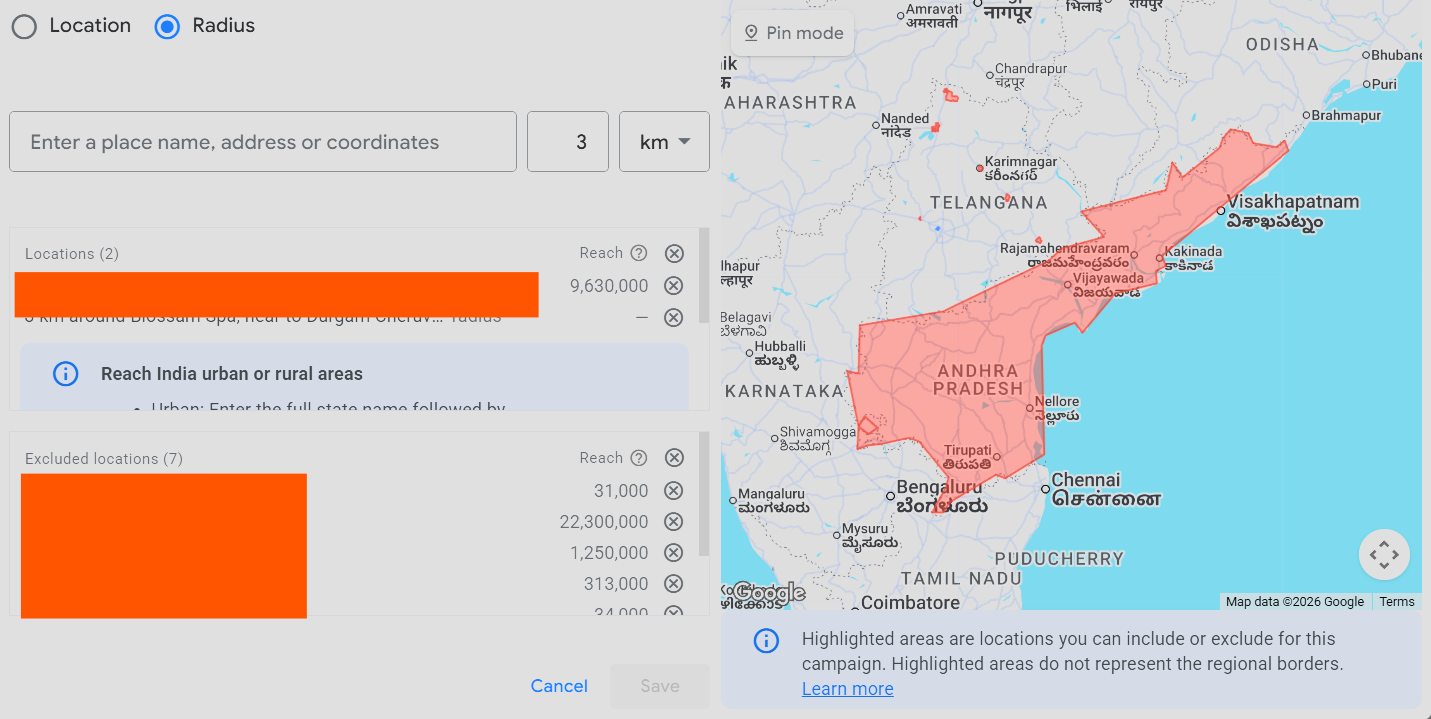
- Select the Radius icon.
- Drop a pin on your exact business location and set a tight radius (e.g., 5km).
4. Step 3: Excluding Faraway Locations
Even with a tight radius, you need to actively tell Google which neighborhoods to block. Go to your Locations tab, select Excluded, and add the names or pin codes of all distant neighborhoods. Also, add those location names as Negative Keywords to ensure someone typing "[Service] in [Faraway City]" never sees your ad.
5. Mistakes That Override Your Location Settings
Even if you fix the settings, these common traps can still bring in long-distance leads:
- Search Partners: Uncheck "Include Google search partners." These sites often believed to ignore your location settings not confirmed.
- Broad Match Overload: If you use pure Broad Match without negative keywords, Google might "creatively" show your ad to people outside your area.
- Campaign vs Account: Sometimes settings are fixed in one campaign but a second campaign is still set to "Interest."
6. How to Verify the Fix (The 48-Hour Check)
Wait 48 hours after making these changes, then check these two reports to verify your local lead generation is actually working:
- Locations Report: Navigate to Locations > User location report. If you see clicks coming from outside your radius, your settings aren't locked down yet.
- Search Terms Report: Look at the exact phrases people typed. If you still see the names of other cities, add them to your Negative Keyword List immediately.
7. Why I Can Stop Your Wasted Ad Spend
I know local business. I know digital marketing. And I am affordable. I am a certified Google Partner who specializes in Google Ads for local business.
I don't care about "impressions" or fancy graphs. I care about your phone ringing with a customer who is only 10 minutes away from your shop. I have already built the master negative keyword lists needed to block bad traffic across major Indian cities. I cut through the vague agency talk and build systems that actually bring you walk-ins and bookings.
Related Marketing Guides
Stop Long-Distance Spa Leads
Our specialized blueprint for wellness brands.
Fix Missing Call Buttons
Restore your direct call features on Google Maps.
Frequently Asked Questions
What is the difference between Presence and Interest in Google Ads?
The 'Presence or Interest' setting shows your ad to people physically in your area AND people who live far away but are searching for your area. 'Presence' limits ads to people physically there right now.
Do I need a massive budget for local lead generation?
No! Fixing your location settings actually saves you money. You will get more local customers out of the exact same budget you are already spending.